How to capture gclid and fbclid on lead forms
A practical guide to capturing Google Ads gclid, Meta fbclid and UTM parameters on lead forms, then sending them to your CRM without losing attribution.
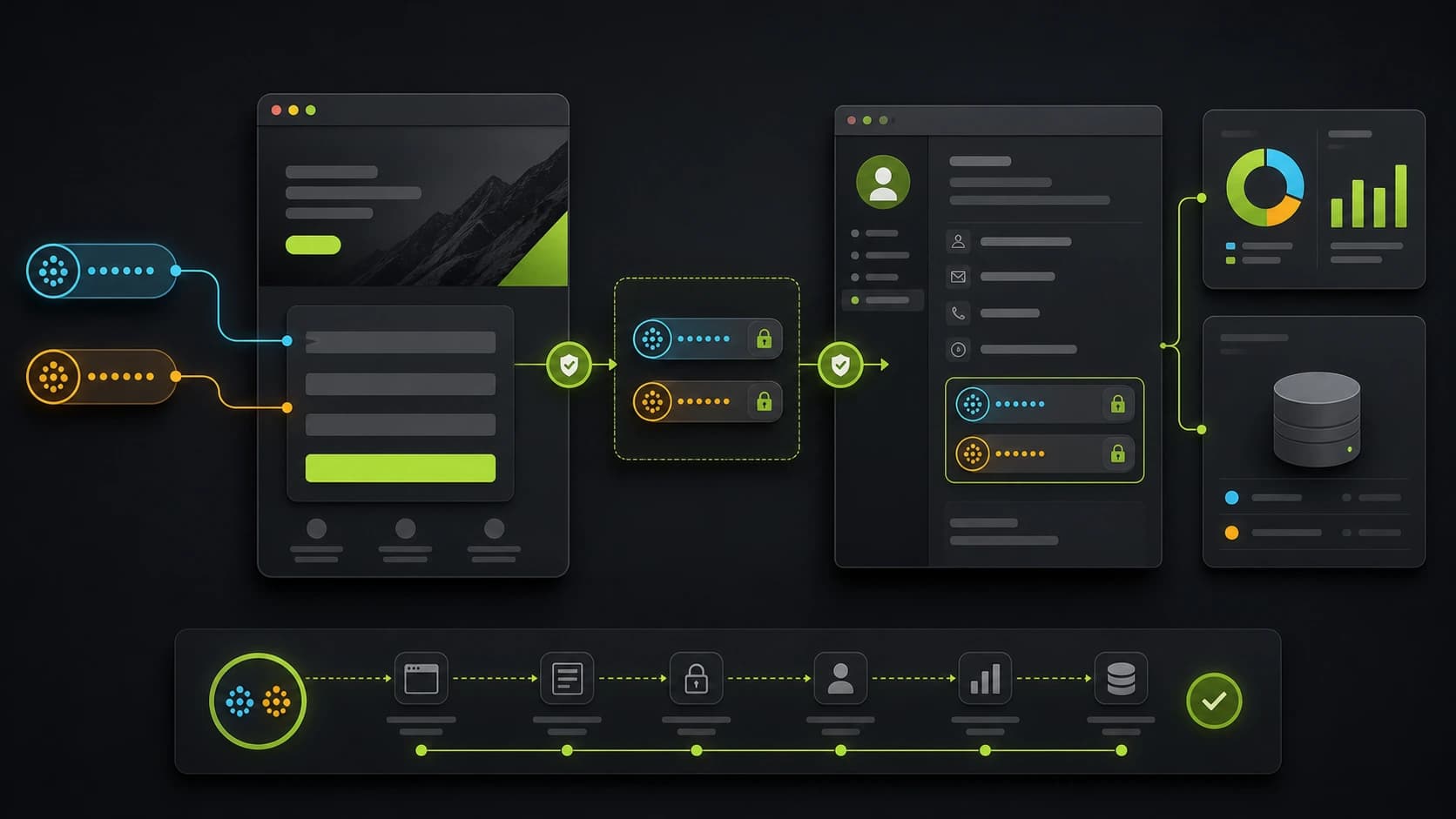
If you run paid traffic to a lead form, attribution is only useful if the click identifiers survive until submission. The problem is simple: gclid, fbclid and UTM parameters usually arrive on the landing URL, while the form submission may happen several screens later, after redirects, scrolls, cookie banners or a return visit.
If those parameters disappear, your CRM receives a lead with no campaign context. Sales sees a name and phone number. Marketing sees a conversion. Nobody can reliably connect the two.
The fix is to capture attribution once, persist it for the session, and submit it with the lead.
What to capture on lead forms
For most lead-gen funnels, capture these fields:
utm_sourceutm_mediumutm_campaignutm_termutm_contentgclidgbraidwbraidfbclid
gclid is the classic Google click identifier. gbraid and wbraid appear in some iOS and privacy-preserving Google Ads flows. fbclid is Meta's click identifier. UTM parameters give you human-readable campaign structure even when platform identifiers are missing.
Do not choose between UTMs and click IDs. Use both. UTMs explain the campaign to humans. Click IDs help ad platforms and offline conversion workflows match the lead back to the click.
For UTM-only implementation details, read how to capture UTM parameters on form submissions.
How to capture gclid in a form
gclid is usually added to the landing URL when Google Ads auto-tagging is enabled. Some privacy-preserving Google Ads flows may use gbraid or wbraid instead, so capture all three.
The implementation pattern is:
- Read
gclid,gbraidandwbraidfrom the landing URL. - Store non-empty values in session attribution.
- Preserve them through every form step.
- Submit them with the final lead payload.
- Store them in CRM fields instead of a free-text note.
If your funnel embeds a third-party form, use hidden fields only if you can prove they populate before submission and survive redirects. For multi-step funnels, storing the values in application state or server-side session data is safer.
How to capture fbclid in a form
fbclid is Meta's click identifier. Read it from the landing URL the same way you read UTMs and Google click IDs.
For Meta CAPI, fbclid can also be used to construct fbc in the format Meta expects when the _fbc cookie is not already present. That value should be created and persisted consistently, then included in the server-side event when consent and configuration allow it.
The practical rule is simple: capture fbclid before the visitor leaves the first page. If you wait until the thank-you page, it may already be gone.
Capture on the first page view
The first rule: read the query string as soon as the visitor lands.
If the funnel has multiple steps, do not wait until the contact step. By then the URL may no longer contain the original parameters. Store the values in a session-level attribution object and reuse that object when the final lead submits.
The basic shape is:
const params = new URLSearchParams(window.location.search);

const attribution = {
  utmSource: params.get("utm_source"),
  utmMedium: params.get("utm_medium"),
  utmCampaign: params.get("utm_campaign"),
  utmTerm: params.get("utm_term"),
  utmContent: params.get("utm_content"),
  gclid: params.get("gclid"),
  gbraid: params.get("gbraid"),
  wbraid: params.get("wbraid"),
  fbclid: params.get("fbclid"),
};
In production, add trimming, length limits and a whitelist of accepted keys. Attribution fields are user-controlled input because query strings are user-controlled input.
Persist without overwriting good data
The common mistake is overwriting a good first-touch value with a later empty value. If a visitor lands with gclid=abc, moves to another page with no query string, and your code writes null over the stored value, attribution is gone.
Use this rule:
- If the current URL has a non-empty value, store it.
- If the current URL does not have a value, keep the existing stored value.
- If a new paid click arrives later with a fresh click ID, update the stored value.
For most SaaS lead funnels, session storage is enough for the active journey. If you need longer attribution windows, use a server-side session or first-party cookie, with your privacy notice and consent model reviewed.
Submit attribution with the lead
Hidden fields can work for embedded forms, but they are brittle. A better pattern is to keep attribution in application state and include it in the final API payload:
{
  "contact": {
    "name": "Ada Lovelace",
    "email": "ada@example.com",
    "phone": "+393331234567"
  },
  "answers": [
    { "key": "budget", "value": "5000-10000" }
  ],
  "attribution": {
    "utmSource": "meta",
    "utmCampaign": "coach_offer_q2",
    "fbclid": "IwAR0..."
  }
}
Then store those fields on the lead row and forward them to the CRM. Do not bury attribution inside a note field if your CRM supports custom properties. Sales and reporting need these values as structured data.
Consent and ad-platform matching
Capturing UTM parameters for operational reporting is not the same as firing marketing scripts or sending hashed contact data to ad platforms.
For EU traffic, keep the consent model explicit:
- Analytics and marketing scripts should respect the cookie banner state.
- Hashed email or phone sent to ad platforms is still personal data in practice.
- Server-side CAPI and Enhanced Conversions should only send user data when the user has given the relevant consent.
- You can still store campaign parameters with the lead for internal attribution if your privacy notice and lawful basis support it.
This is why attribution should be part of the funnel architecture, not a late tag-manager patch.
For the server-side side of this workflow, see how to set up server-side tracking for lead generation.
CRM fields to create
At minimum, create these lead/contact properties:
first_utm_sourcefirst_utm_mediumfirst_utm_campaignfirst_utm_contentfirst_utm_termlatest_utm_sourcelatest_utm_campaigngclidgbraidwbraidfbclidlanding_pageconversion_page
First-touch fields help acquisition reporting. Latest-touch fields help tactical campaign reporting. Landing and conversion page fields help diagnose broken routing or mismatched ads.
QA checklist
Before trusting the setup, test it manually:
- Open the funnel with fake parameters:
?utm_source=test&utm_campaign=test_campaign&gclid=test-gclid&fbclid=test-fbclid. - Move through every step and submit a test lead.
- Confirm the lead record contains every parameter.
- Confirm the webhook or CRM payload contains the same values.
- Refresh or navigate inside the funnel and make sure existing values are not overwritten by blanks.
- Test with marketing consent rejected and accepted, then confirm scripts and server events behave differently.
How Fluenx handles this
Fluenx captures UTM, gclid, gbraid, wbraid and fbclid on the landing page, keeps them through the funnel, saves them on the lead, and forwards them through webhooks and integrations. You get attribution attached to the contact record without writing hidden-field logic or custom scripts.